Rust On-Chain Contract and Client on Solana
What is Solana?
Solana is a high-performance blockchain designed for decentralized applications and cryptocurrencies. It achieves speed and scalability through several innovations:
- Proof of History (PoH) — a cryptographic clock that timestamps transactions before consensus, enabling parallel processing without the bottleneck of sequential execution found in chains like Ethereum.
- Parallel transaction processing — Solana’s Seaport scheduler processes non-overlapping transactions concurrently. Unlike Ethereum’s single-threaded EVM, Solana can handle thousands of transactions per second.
- Low fees (~$0.0002) and fast finality (~400ms) — achieved through PoH combined with Tower BFT consensus.
- Stateless programs + account model — on-chain programs (smart contracts) are stateless shared libraries. They persist state by owning dedicated accounts. Clients must declare all accounts an instruction touches upfront, enabling the runtime to parallelize safely.
- Rust-based development — programs compile to BPF (Berkeley Packet Filter) bytecode, not EVM bytecode. Development is in Rust or C, giving access to the full Rust ecosystem and strong memory safety guarantees.
- No mempool — transactions are forwarded directly to the current leader, unlike Ethereum’s public mempool where pending transactions are visible to all.
These design choices make Solana fundamentally different from Ethereum, both in architecture and development model.
This Project
This project demonstrates how to use Solana Rust APIs to write a Solana on-chain program (contract) and an off-chain client program in Rust via a simple counter example.
The project comprises:
- An on-chain counter program
- A Rust client that can send an “Increment” counter message to the on-chain program and get the current reading
Source
The full source code is available at github.com/ratulb/solana_program_and_rust_client.
About the Author
Created by Ratul Buragohain. Licensed under GPL-3.0.
Quick Start
The following dependencies are required to build and run this example:
- Install Rust v1.60.0 or later from rustup.rs
- Install Solana v1.10.8 or later from docs.solana.com/cli/install-solana-cli-tools
If this is your first time using Rust, see the Installation Notes.
Configure CLI
Set CLI config url to localhost cluster:
solana config set --url localhost
Create CLI Keypair (if first time):
solana-keygen new
Start Local Solana Cluster
solana-test-validator
For a clean slate after trials:
solana-test-validator --reset
Note: You may need to do some system tuning to get the validator to run.
View on-chain program logs in a separate terminal:
solana logs
Note: Use
msg!macro for logging inside the on-chain program.
Build the On-Chain Program
cd program
cargo build-bpf
Deploy the On-Chain Program Locally
solana program deploy target/deploy/program.so
Run the Rust Client
cargo run
Expected Output
Connecting to cluster...http://localhost:8899
Connection to cluster established
Cluster node solana version 1.10.5
Counter account B6rWFbQ4pmb4pvcZstFCjLXffZSaqqn6c8fdXzpK3WSX already exists. Owner program: HGsPi7r4MEeUSC74vzx9qCqJvuuBb3AcjNc5MrtEjCGu
Binary address 8cRrhLjJ7sSbSa1kuaShq2Ywu1otyRhkNwTQ3E1Bqr4T
Fee for message 5000
Counter value 1
Values will differ!
Not seeing the expected output? Ensure you’ve started the local cluster, built the on-chain program, and deployed it.
Deploy to Devnet
solana config set --url d
solana program deploy target/deploy/program.so
Deploy to Testnet
solana config set -ut
solana program deploy target/deploy/program.so
Note: You may not have required SOL balance. Airdrop SOL into your account:
solana balance
solana airdrop 1
Installation Notes
If you are a first-time user of Rust, the notes below may help you to install some of the dependencies on a Mac or Linux workstation.
Rust
Install Rust using rustup. Rustup will install the latest version of Rust, Cargo, and other binaries used in Solana.
Note: If this is the first time installing Rust on Linux, you may need to install
build-essential:sudo apt install build-essential -y
Follow the instructions at Installing Rust.
For Mac users, Homebrew is also an option:
brew install rustup
rustup-init
See Mac Setup for more details.
After installation, you should have rustc, cargo, and rustup. Ensure ~/.cargo/bin is in your PATH.
Clone the Repository
git clone https://github.com/ratulb/solana_program_and_rust_client.git
cd solana_program_and_rust_client
(If you plan to submit pull requests, fork the repository first and then clone your fork.)
Project Structure
The project uses Cargo workspaces.
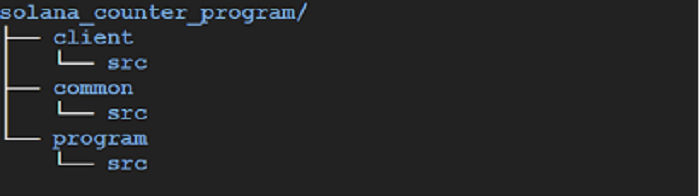
Cargo Workspace
The workspace defined in Cargo.toml contains three members:
[workspace]
members = [
    "common",
    "program",
    "client",
]
Crates
| Crate | Path | Purpose |
|---|---|---|
program | program/ | The on-chain Solana counter program (BPF) |
client | client/ | Rust CLI client that invokes the on-chain program |
common | common/ | Shared types (structs, enums) used by both program and client |
For experimentation, tweak files under program/, then rebuild and redeploy the on-chain program before re-running the client.
More About the On-Chain Program
To write an on-chain Solana program, follow these steps:
1. Implement the Entrypoint Function
Provide a function whose type signature matches solana_program::entrypoint:
#![allow(unused)]
fn main() {
fn process_instruction(
    program_id: &Pubkey,
    accounts: &[AccountInfo],
    instruction_data: &[u8],
) -> ProgramResult
}program_id— the program’s pubkey (can be changed usingsolana-keygen grindto generate a vanity keypair, passed as--program-idduring deployment).accounts— consolidated list of all accounts that instructions read and/or write to. They appear in the orderAccountMetastructs are added to each instruction and the order instructions are added to the containing message. AllAccountInfoentries must have their writable/readable/signer attributes set. For example, the counter account is constructed withAccountMeta::new— writable but not a signer.instruction_data— raw byte array of data passed from the client.
2. Decorate with the Entrypoint Macro
Apply the entrypoint macro:
#![allow(unused)]
fn main() {
entrypoint!(process_instruction);
}
This embeds your implementation inside an external C function called entrypoint (annotated with no_mangle so the compiler keeps the name).
3. Define no-entrypoint Feature
During development you may depend on other crates that have their own entrypoints. Since there cannot be multiple entrypoints at runtime, declare the entrypoint feature in program/Cargo.toml:
[features]
no-entrypoint = []
If another crate wants to use your program’s types without including the entrypoint, they add:
program = { version = "0.1.0", path = "../program", features = ["no-entrypoint"] }
Read more in the Solana docs.
4. Build the Program
During cargo build-bpf, the program is compiled to Berkeley Packet Filter (BPF) bytecode and stored as an ELF shared object. A program keypair is also generated — its pubkey becomes the default program_id.
5. Deploy to the Network
The Solana CLI:
- Breaks the compiled bytecode into smaller chunks (due to restricted transaction size)
- Sends chunks to an intermediate on-chain buffer account in a series of transactions
- Once transmission is complete and verified, a final transaction moves the buffered content to the program’s data account
This completes a new deployment or a program upgrade. Transaction costs are deducted from the payer’s account.
See this post for more detail.
State Management
Solana on-chain programs are stateless and compiled as shared libraries (crate-type = ["cdylib"]). They cannot maintain state across invocations. To persist state, programs use accounts that they own.
There is a limit of ~10 MB per account. Space incurs cost (rent). An account can be rent-exempt if it maintains at least two years’ worth of rent as balance. On-chain programs are expected to be rent-exempt.
Calculate rent-exempt lamports:
solana rent 1000 # bytes
Or programmatically via RpcClient::get_minimum_balance_for_rent_exemption.
The Rust Client
The client is a Rust CLI program with a main function that performs five tasks:
- Establish a connection to the cluster
- Set up an account to store counter program state
- Check if the on-chain program has been deployed
- Send a counter increment transaction
- Query the counter account
Establish a Connection
The Client creates an instance of RpcClient in its get_rpc_client method.
This sets up an HTTP client to the Solana network, configured from ~/.config/solana/cli/config.yml. Once established, the client can:
- Query accounts
- Send transactions
- Get cluster information
- And much more (see the RpcClient docs)
The json_rpc_url entry in ~/.config/solana/cli/config.yml is set via:
solana config set --url localhost
Other options: devnet, testnet, mainnet-beta.
Setup Counter Account
Solana on-chain programs are stateless — they cannot persist data between invocations. State is stored in accounts that the program owns.
Note: Programs are also stored in accounts, marked as executable. Deploy with
solana program deploy(upgradeable) vssolana deploy(final, uses BPFLoader).
Account Setup Flow
1. Retrieve Payer Pubkey
The payer pubkey is derived from ~/.config/solana/id.json. The program ID is derived from ./target/deploy/program-keypair.json. If the program has not been built, setup fails immediately.
2. Derive Counter Account Address
The counter account pubkey is derived from the payer pubkey, a seed string, and the program ID (owner of the account). A query is made to the chain:
- Account exists → early exit, nothing to set up
- Account does not exist → proceed to create it
3. Calculate Rent-Exempt Balance
Calculate the minimum balance required for the counter account to stay rent-exempt based on its data size. The Counter struct:
#![allow(unused)]
fn main() {
struct Counter {
    count: u64,      // 8 bytes
}
}
It derives BorshSerialize and BorshDeserialize for serialization. A helper computes the struct size:
#![allow(unused)]
fn main() {
const COUNTER_SIZE: usize = std::mem::size_of::<u64>();
}
The rent exemption amount is fetched from the network:
#![allow(unused)]
fn main() {
let lamports = client.get_minimum_balance_for_rent_exemption(COUNTER_SIZE)?;
}
4. Construct Create Account Instruction
The system instruction for creating the counter account is constructed with the lamports amount, space, and owner (program ID).
5. Query Blockhash
The latest blockhash is retrieved from the network. This measures how recent the client’s view of the network is and is used to accept/reject transactions.
6. Calculate Fee
The network is queried for the required fee for the transaction message — the cost of executing the transaction.
7. Airdrop Lamports
The total cost (rent exemption + transaction fee) is funded via an airdrop:
#![allow(unused)]
fn main() {
client.request_airdrop(&payer, total_lamports)?;
}
The airdrop can be skipped by setting the skip_airdrop environment variable to a non-empty value, or if the payer already has sufficient balance.
8. Send Transaction
The create-account transaction is sent to the network and a transaction signature is returned.
Check Deployment
Before sending transactions, the client verifies the on-chain program is deployed.
Verification Flow
1. Check Program Keypair
The client looks for the program keypair at ./target/deploy/program-keypair.json. This file is generated during cargo build-bpf. If not found, the client exits with an error.
2. Retrieve Program Account
The program account is retrieved using the pubkey from the keypair. The client checks two things:
- The account exists on-chain
- The account is executable
3. Handle Upgradable vs BPF Loader
This check alone is not sufficient for programs owned by the upgradable BPF loader (BPFLoaderUpgradeab1e11111111111111111111111). When a program is closed via solana program close, the program data account is wiped, but the program account still reports as executable.
The client handles this by also checking for the program data account where actual bytecodes are stored:

The blue line (BPF Loader) does not allow closing a deployed program. The red underline (Upgradeable BPF Loader) — we query the program data account; if it’s empty, the program was closed even though the program account says executable.
Send a Counter Increment Transaction
The client submits a transaction to the on-chain counter program to increment the counter value stored in the owned account.
How Instructions Work
To invoke a Solana on-chain program, send a Transaction containing a Message, which encapsulates one or more Instructions.
Each instruction has a data field — a Vec<u8> of program-specific bytes. The Solana runtime is agnostic about the data format, but provides APIs for constructing instructions from:
- Borsh — preferred, has a stable specification
- Bincode — has a published spec but noted as computationally expensive
You can also invent your own serialization and use the low-level API.
In This Project
The client uses Borsh serialization. The custom data is an enum:
#![allow(unused)]
fn main() {
enum CounterInstruction {
    Increment,
}
}
This enum is defined in the common crate and is shared between the client (for serialization) and the program (for deserialization).
Instruction Construction
#![allow(unused)]
fn main() {
let instruction = Instruction {
    program_id: counter_program_id,
    accounts: vec![
        AccountMeta::new(counter_account, false),  // writable, not signer
    ],
    data: CounterInstruction::Increment.try_to_vec()?,
};
}
Passing Accounts
Accounts that the program reads or modifies during execution must be passed in AccountMeta structs:
AccountMeta::new(pubkey, is_signer)— writable accountAccountMeta::new_readonly(pubkey, is_signer)— read-only account
Passing accounts lets the Solana runtime parallelize transactions.
Try this: Comment out the single instruction and uncomment the line that clones the instruction and packs it twice. What happens when you send two increment instructions in one transaction?
Transaction Submission
The usual steps:
- Load payer keypair and program ID
- Query latest blockhash
- Calculate fee for message
- Create the transaction with the instruction(s)
- Sign and send
Query the Counter Account
Each time the client runs, it increments the counter value stored in the counter account owned by the on-chain program.
Reading the Counter Value
- The counter account is loaded by its derived pubkey
- The
datafield of the account is deserialized into aCounterstruct using Borsh - The
countfield is printed
#![allow(unused)]
fn main() {
let account = client.get_account(&counter_address)?;
let counter = Counter::try_from_slice(&account.data)?;
println!("Counter value {}", counter.count);
}
Every execution of cargo run increments the counter by 1.
Experiment: Concurrent Increments
If you start the validator in a clean state and run:
for _ in {0..99}; do cargo run; done
from two terminals simultaneously — the counter value should be 200. But it won’t be!
Why? Check all the entries in ~/.config/solana/cli/config.yml for the answer.
Using solana deploy Instead
If you deploy with solana deploy program.so instead of solana program deploy:
- The program is owned by the BPF loader (not upgradeable)
- A randomly generated program ID is assigned
- Pass it to the client via the
program_idenvironment variable:
program_id=<generated_id> cargo run